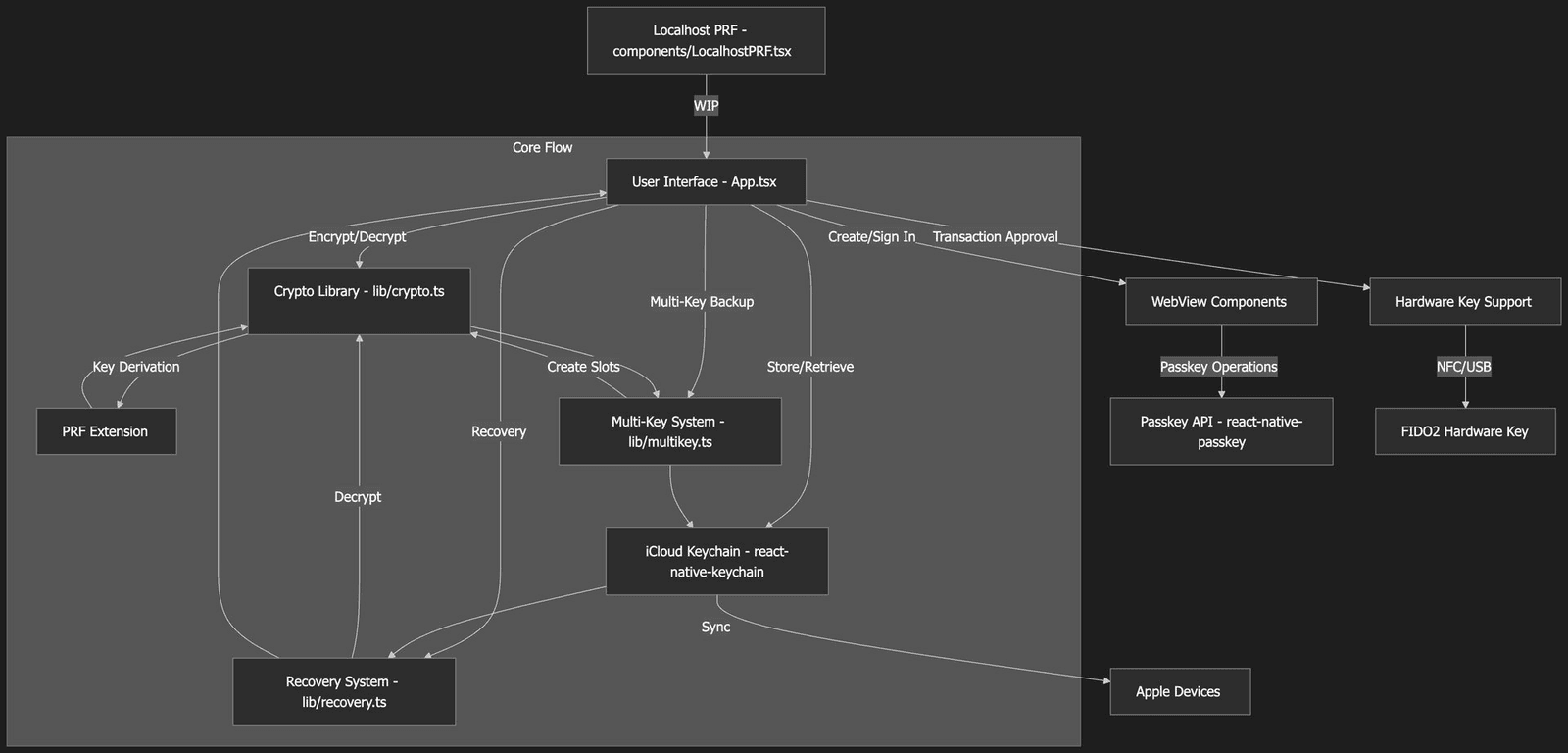
Nuri Wallet iOS Expo App Mermaid Chart of the Architecture

TL;DR: Nuri is a React Native Expo app that encrypts Bitcoin seeds with keys derived from WebAuthn passkeys via PRF. Seeds are encrypted with XChaCha20-Poly1305, stored in iCloud Keychain and recoverable with more than one passkey. It's an MIT licensed proof of concept with WIP features, and a Mermaid chart shows the architecture.
This is a look at the codebase of the Nuri wallet, based on the README.md and the main App.tsx file. First what the code does, and then a Mermaid chart of the architecture.
What the app does

Nuri here is a React Native Expo app built around passkey based Bitcoin seed encryption. It uses WebAuthn passkeys with the PRF extension, PRF meaning Pseudo-Random Function, to encrypt Bitcoin seeds, store them in iCloud Keychain and recover them with more than one passkey. The app is made for iOS 16+ devices with Face ID or Touch ID and iCloud Keychain turned on.
You create a passkey and sign in with it, and the app derives encryption keys from it via PRF. With those keys it encrypts the Bitcoin seed using XChaCha20-Poly1305. A backup can be decrypted by several passkeys, and that's the version 3 format. The encrypted backups go into iCloud Keychain with a namespace per user.
There is also support for hardware security keys like a YubiKey to approve transactions, but iOS limits PRF on hardware keys. And recovery works with any passkey that belongs to the backup, or with guardian DEKs.
How the code is organized
At the root you find the config and entry points, so App.tsx with
the main UI and logic, index.js as the React Native entry,
package.json, tsconfig.json and so on. The core utilities live in
lib/. There crypto.ts does the key derivation with HKDF-SHA256,
the encryption with XChaCha20-Poly1305 and the PRF normalization.
multikey.ts handles multi key backups with key slots for more
passkeys, recovery.ts finds out the backup version and recovers
seeds, and inAppLocalhostServer.ts is probably for an in-app server
and still WIP. In components/ there is LocalhostPRF.tsx for a
localhost PRF server, also still work in progress.
Then there are the WebView components, EmbeddedPRF.tsx for domain
bound passkey authentication and CreatePasskeyWebView.tsx for making
new passkeys. docs/ has a lot of documentation and server examples,
like HTML files to test PRF and the PWA. scripts/ has things like
guardian-server.mjs for the guardian features, and assets/ has the
app icons and splash screens.
App.tsx, security and dependencies

The heart of the app is App.tsx. It holds the UI and the wallet
state, so the state for PRF, the DEK (the Data Encryption Key),
guardians, hardware keys and backups. The UI walks you through the
steps. Create a passkey, sign in, encrypt the seed, store it in
iCloud, add recovery keys and recover the seed.
Passkey operations go through WebViews that are domain bound to
passkey.nuri.com. Hardware keys approve transactions over NFC or
USB. And the recovery flow handles single key backups (v1) and multi
key backups (v3) and asks you to pick the key.
On security, the encryption uses a master key that is encrypted into a
slot for each passkey. Backups are stored per user in iCloud Keychain
with their own service name, for example com.nuri.seed.backup.Alice.
There are limits too. PRF is tied to the device, so recovery on
another device needs manual DEK sharing, and iOS restricts PRF on
hardware keys.
The main dependencies are react-native-passkey for WebAuthn,
react-native-keychain for iCloud, @noble/hashes for the crypto
primitives and others like expo-random and react-native-webview.
The whole thing is a proof of concept with some WIP features, like
localhost PRF and guardian recovery. It's MIT licensed and it puts a
lot of weight on security warnings.
The architecture chart
This Mermaid flowchart shows the high level architecture and flow, so the main parts and how they work together when you encrypt and recover.
graph TD
    A[User Interface - App.tsx] -->|Create/Sign In| B[WebView Components]
    B -->|Passkey Operations| C[Passkey API - react-native-passkey]
    A -->|Encrypt/Decrypt| D[Crypto Library - lib/crypto.ts]
    D -->|Key Derivation| E[PRF Extension]
    A -->|Multi-Key Backup| F[Multi-Key System - lib/multikey.ts]
    F -->|Create Slots| D
    A -->|Recovery| G[Recovery System - lib/recovery.ts]
    G -->|Decrypt| D
    A -->|Store/Retrieve| H[iCloud Keychain - react-native-keychain]
    H -->|Sync| I[Apple Devices]
    A -->|Transaction Approval| J[Hardware Key Support]
    J -->|NFC/USB| K[FIDO2 Hardware Key]
    L[Localhost PRF - components/LocalhostPRF.tsx] -->|WIP| A
    subgraph "Core Flow"
        E --> D --> F --> H
        H --> G --> A
    end
It starts with what the user does in the main app, then shows the flows for passkeys, encryption, backup and recovery, and also the links to outside systems like hardware keys and iCloud.